By AppUnbound Editorial · Published

CleanShot X alternative

A CleanShot X alternative for screenshots that need to ship.

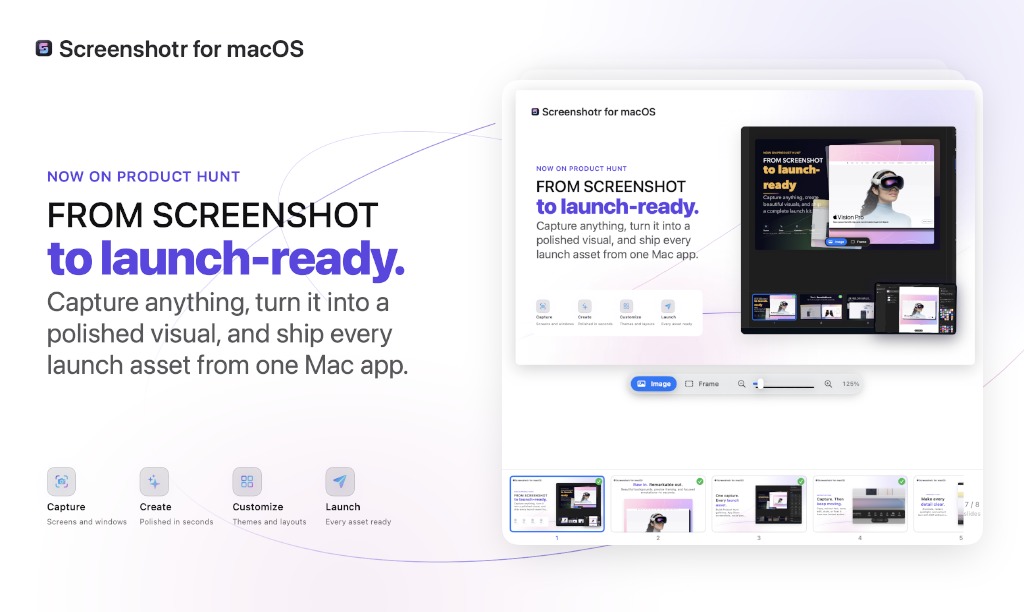
Screenshotr captures, annotates, redacts and styles screenshots, then turns them into complete Launch Kits for Product Hunt, the App Store and social media. It is $9 once — and Codex or Claude Code can help through permissioned MCP access.

Free trial available1 year of updatesNotarized by Apple
Screenshotr
$9once
$20 less for a permanent licence
Editable multi-slide Launch Kits
MCP for Codex and Claude Code
Notarized by Apple · installed and used by our team
VS
CleanShot X
$29once
Screen recording with camera and audio
1 GB of hosted sharing included
Supports older versions of macOS
Short answer

Yes. Screenshotr is a direct CleanShot X alternative for Mac users who capture, annotate, redact, style and export screenshots. Both apps provide area, window, full-screen and scrolling capture, on-device OCR, annotation, backgrounds and floating screenshots. Screenshotr costs $9 once and goes further for launch assets with reusable visual presets, exact platform canvases, editable multi-slide Launch Kits and permissioned MCP access for Codex and Claude Code. CleanShot X costs $29 once and is still the better choice if you also need screen recording, capture history or built-in hosted share links.

Screenshotr
$9 once, 1 year of updates
CleanShot X
$29 once, 1 year of updates
Both provide
Capture, annotation, OCR and styling
Screenshotr adds
Launch Kits and MCP
CleanShot X adds
Video, history and hosted links
Notarized by Apple

Scanned for malware and signed by Apple before macOS will run it. It opens on the first try — no Gatekeeper warning, no right-click workaround.

Installed and used by a person here

Every app on AppUnbound is downloaded, installed and actually used by someone on our team before it is listed.

Bought here, not from a download site

One receipt, a re-download whenever you need it, and a 14-day refund if it is not what you expected.

Screenshotr running on macOS
Line by line

Is Screenshotr a good CleanShot X alternative?

The overlapping screenshot workflow is compared first, followed by the features that make each app the better choice for a different buyer. CleanShot X wins are stated plainly.

Screenshotr compared with CleanShot X, feature by feature. Last checked August 2026.
Feature Screenshotr CleanShot X
Price for one Mac
Both are permanent licences
Screenshotr
$9 once
CleanShot X
$29 once
Updates included
Screenshotr
1 year
CleanShot X
1 year; another year is an optional $19 renewal
Free trial
Screenshotr
Available from the Screenshotr listing
CleanShot X
No direct trial; 30-day money-back guarantee or a Setapp trial
Area, window and full-screen capture
Screenshotr
Yes, with familiar Mac shortcuts
CleanShot X
Yes
Scrolling capture
Screenshotr
Yes
CleanShot X
Yes, vertically and horizontally
Annotation
Screenshotr
Text, shapes, arrows, spotlight, blur and redaction
CleanShot X
Broad toolkit including text, shapes, arrows, spotlight, blur, pixelate, counters and drawing
On-device OCR
Screenshotr
Extract text locally
CleanShot X
Extract text on-device with automatic language detection
Floating screenshots
Screenshotr
Float a capture from the instant action bar
CleanShot X
Pin captures with size, opacity, position and lock controls
Backgrounds and framing
Screenshotr
Backgrounds, frames, patterns, padding and shadows
CleanShot X
Background tool with padding, alignment, aspect ratio and auto balance
Reusable visual presets
Screenshotr
Save styles for consistent output
CleanShot X
Capture and editing presets are available
Instant post-capture actions
Screenshotr
Copy, OCR, save, edit, style or float
CleanShot X
Copy, save, annotate, upload or drag from Quick Access Overlay
Editable multi-slide Launch Kits
Coordinated sets rather than one image
Screenshotr
Built for complete Product Hunt and App Store sets
CleanShot X Can combine images, but no launch-kit workflow is advertised
Platform-sized canvases
Screenshotr
Product Hunt, App Store, social and presentation sizes
CleanShot X
Background tool provides selectable aspect ratios
Export complete slide sets
Screenshotr
Export the full set with custom filenames
CleanShot X No coordinated slide-set export is advertised
Coding-agent workflow
Screenshotr
Permissioned MCP access for Codex and Claude Code
CleanShot X No MCP integration is advertised
What an agent can see
Screenshotr
Only screenshots explicitly selected for temporary access
CleanShot X No coding-agent workflow is advertised
URL scheme automation
Screenshotr
No public URL scheme
CleanShot X
Capture, record, OCR, annotate, pin and other commands
Screen recording
Screenshotr
No — Screenshotr is for still images
CleanShot X
MP4 or GIF with microphone, computer audio, camera, clicks and keystrokes
Capture history
Screenshotr
A capture library, without CleanShot's one-month restore history
CleanShot X
Search, restore and filter captures from up to one month
Hosted share links
Screenshotr
No built-in hosting
CleanShot X
1 GB included; Cloud Pro adds unlimited storage and team controls
Editable proprietary project
Screenshotr
Launch Kits remain editable in Screenshotr
CleanShot X
Annotated images can be saved as editable .cleanshot files
Local operation
Screenshotr
Capture, OCR, editing and MCP work locally
CleanShot X
Capture and OCR work locally; Cloud upload is optional
Minimum macOS
Screenshotr
macOS 14.0
CleanShot X
macOS 10.15 Catalina or newer
Download size
Screenshotr
14.4 MB
CleanShot X Not stated on CleanShot's pricing or feature pages
Money-back period
Screenshotr
14 days after purchase
CleanShot X
30 days

Last checked . Prices and features change — if something here is out of date, tell us and we’ll correct it.

Built in public

How Screenshotr has evolved

The feature table is a snapshot. These releases show where the product is heading.

Latest release
Version 1.3.2

Faster capture-library browsing with recent/archive filters, search, and pagination.

Previous milestones 6 releases since August 2026
  1. v1.3.1

    Fixed MCP setup so Codex, Claude Code, and other clients can register Screenshotr without CLI detection.

  2. v1.3.0

    Added designer annotations with rotatable Swoosh arrows and richer typography controls.

Complete version history

Can I switch from CleanShot X without losing anything?

Finished PNG, JPEG and other exported images remain ordinary files. Editable .cleanshot projects and CleanShot capture history do not import into Screenshotr, so export anything unfinished before changing workflows.

1

Export unfinished CleanShot projects

Open any .cleanshot file you still need and export a finished image. Ordinary images already on your Mac need no conversion.

2

Try one real capture in Screenshotr

Install the free trial, capture a window or area, then use the action bar to annotate, extract text, style or float it.

3

Build the asset you actually ship

Choose a Product Hunt, App Store, social or presentation canvas, save the visual style, and export the finished set with the filenames you need.

Keep CleanShot X installed if you still need its screen recorder, hosted links or old project files. The licences do not prevent the apps from living beside each other.

What do people use Screenshotr for?

Screenshot work that continues after the capture button is pressed.

Launch

A complete Product Hunt image set

Place captures into a coordinated, editable Launch Kit, preview every slide and export the complete set instead of styling each image from scratch.

App Store

Screenshots at the required canvas sizes

Compose inside platform-sized canvases with repeatable backgrounds, frames, padding and filenames.

Docs

A screenshot that explains itself

Annotate the important detail, spotlight the focus, redact private information and extract text locally without moving between apps.

Agents

Visual work shared with a coding agent

Give Codex or Claude Code temporary access to selected captures so it can inspect and refine editable assets without taking over the Mac.

Why people move to Screenshotr

01
It competes on the same core workflow

Area, window, full-screen and scrolling capture lead into annotation, local OCR, styling, floating references and export — the work CleanShot buyers expect.

02
The endpoint is a shippable asset

Screenshotr adds reusable styles, exact platform canvases and editable multi-slide Launch Kits for people producing a launch rather than sending one quick capture.

03
Your coding agent can participate

Permissioned MCP tools let Codex and Claude Code inspect selected captures and work on compositions while access stays explicit and temporary.

04
The permanent licence costs less

Screenshotr is $9 once with a year of updates. CleanShot X is $29 once with the same initial update period and 1 GB of hosted storage.

Which CleanShot X alternative is best for you?

Both are capable screenshot tools. The deciding question is what happens to the capture next.

Launch-ready image sets
Screenshotr — $9 once, with reusable styling, platform canvases and editable multi-slide Launch Kits.
Screenshots plus screen recording
CleanShot X — $29 once, with camera, microphone, computer audio, GIF and video editing.
Hosted links and team controls
CleanShot X Cloud Pro — $8 per user per month billed annually, with unlimited storage, branding, security and team management.
Lightweight capture and pixel tools
Shottr — $12 once, with a long-term free mode, scrolling capture, OCR, pinning, measurements and S3 upload.
Fast automatic beautification
Xnapper — $29.99 once, with automatic balance, backgrounds, sensitive-data redaction and social ratios.
Basic capture and markup for free
macOS Screenshot + Preview — Already included with macOS for screen, window and selection capture plus ordinary markup.
Screenshots built with a coding agent
Screenshotr — Permissioned MCP access for selected captures, editable compositions, previews and exports.

What are the best CleanShot X alternatives?

Screenshotr is not the only option, and for some people it is not the right one. Here is the whole field in one table.

Every CleanShot X alternative for macOS, with what each one costs and who it suits.
Tool What it costs Offline Best for
Screenshotr
What it costs$9 once OfflineYes Best forLaunch-ready screenshots, reusable styles, Launch Kits and MCP
What it costs$29 once OfflineYes Best forScreenshots, annotation, video recording, history and quick sharing
What it costs$12 once; free mode OfflineYes after activation Best forA tiny, fast capture tool with OCR, scrolling, pinning and pixel measurements
What it costs$29.99 once; free with watermark OfflineYes Best forAutomatically balanced, styled screenshots and one-click sensitive-data redaction
What it costsIncluded with macOS OfflineYes Best forBasic full-screen, window and selection capture with markup

Prices and free tiers were checked on 6 August 2026 on each product's own page. Start with Apple's built-in tools if they already do enough; the paid choices earn their place through faster workflows, deeper editing or launch-specific output.

Screenshotr at a glance

One Screenshotr fact per row, with release details filled from the current AppUnbound listing.

Screenshotr specifications.
Price $9, one-time
Free trial Available
Updates included 1 year
Minimum OS macOS 14.0
Architecture Universal — Apple Silicon and Intel
Download size 14.4 MB
Current version 1.3.2
Capture modes Area, window, full screen and scrolling content
Annotation Text, shapes, arrows, spotlight, blur and redaction
OCR Local, on-device text extraction
Styling Backgrounds, frames, patterns, padding, shadows and presets
Launch Kits Editable multi-slide sets
Canvas sizes Product Hunt, App Store, social and presentation
Agent integration Permissioned MCP for Codex and Claude Code
Agent access Temporary and limited to selected captures
Notarized by Apple Yes
Refund window 14 days

Screenshotr or CleanShot X: which should you buy?

Screenshotr, if…
You turn raw captures into Product Hunt, App Store, social or presentation assets.
You want coordinated multi-slide Launch Kits instead of styling screenshots one at a time.
You want Codex or Claude Code to inspect selected captures and help build editable visual assets.
You want the lower-cost permanent licence and do not need a screen recorder or hosted links.
CleanShot X, if…
You need video and GIF recording with camera, microphone, computer audio, clicks or keystrokes.
You rely on hosted share links or want Cloud Pro's team and security controls.
You want a searchable, restorable capture history retained for up to a month.
You need to support a Mac older than Screenshotr's current minimum OS.

Screenshotr is the direct CleanShot X alternative when your daily work is capturing, annotating, redacting, styling and exporting still images. It covers the same central screenshot workflow for $20 less and differentiates itself with platform-sized Launch Kits and permissioned MCP access for Codex and Claude Code. CleanShot X remains the stronger all-round capture utility if video recording, a month of restorable capture history, mature URL-scheme automation or hosted share links are part of the requirement.

What these terms mean

The terms that separate two otherwise similar screenshot tools.

One-time purchase
You keep the app version you bought. Screenshotr and CleanShot X each include one year of updates; CleanShot sells another update year as an optional $19 renewal.
Launch Kit
An editable, coordinated set of visual slides rather than a single flattened screenshot. Screenshotr can preview, refine and export the full set.
On-device OCR
Text recognition performed on the Mac so text can be copied from an image without sending the image to a recognition service.
Permissioned MCP access
A coding agent receives temporary access only to captures the user selects, then uses Screenshotr tools to inspect, compose, preview and export visual work.

Common questions

Is Screenshotr a direct CleanShot X alternative?

Yes. Both capture areas, windows, full screens and scrolling content, then provide annotation, local OCR, backgrounds and floating screenshots. Screenshotr focuses further on launch-ready image sets and coding-agent workflows; CleanShot X also records video and provides hosted sharing.

How much does Screenshotr cost compared with CleanShot X?

Screenshotr is $9 once and CleanShot X App + Cloud Basic is $29 once. Both include one year of updates and let you keep using the installed version afterwards. CleanShot offers an optional $19 renewal for another update year.

Does Screenshotr have scrolling capture?

Yes. Screenshotr captures areas, windows, full screens and scrolling content. CleanShot X also provides scrolling capture, including horizontal scrolling.

Can Screenshotr annotate and redact screenshots?

Yes. It provides annotation, spotlighting, blur and redaction, plus backgrounds, frames, patterns, padding and shadows. CleanShot X has a broader established annotation toolkit that also includes counters, freehand drawing and several object styles.

Does Screenshotr perform OCR locally?

Yes. Text extraction runs locally on the Mac. CleanShot X also states that its OCR is performed completely on-device.

What are Screenshotr Launch Kits?

They are editable multi-slide visual sets for Product Hunt, the App Store and other launches. Screenshotr provides platform-sized canvases, reusable styles, previews and full-set export with customizable filenames.

What can Codex or Claude Code do in Screenshotr?

Through MCP, an agent can inspect captures you explicitly select and help build, preview and export editable visual assets. Access is temporary and limited to the screenshots you share.

Does Screenshotr record video like CleanShot X?

No. CleanShot X is the better choice if you need MP4 or GIF recording with microphone, computer audio, camera, click highlights or keystrokes. Screenshotr is intentionally focused on still images and launch assets.

Can I import CleanShot projects into Screenshotr?

No. Finished PNG, JPEG and other exported images remain usable, but editable .cleanshot projects and CleanShot capture history do not import. Export unfinished work before changing workflows.

Does either app require cloud storage?

No. Screenshotr works locally. CleanShot X includes a Cloud account and 1 GB of storage, but CleanShot states that cloud use is not required for the app's other features.

Which app has the longer refund period?

CleanShot X offers a 30-day money-back guarantee. Screenshotr purchases through AppUnbound have a 14-day refund window, and Screenshotr also offers a free trial before purchase.

Sources and how we checked

Screenshotr claims come from its current AppUnbound product listing; CleanShot X claims come from CleanShot's own current product pages. Missing advertised features are described as not advertised, not declared impossible.

Screenshotr listing, features and current release
6 Aug 2026
CleanShot X pricing and system requirements
6 Aug 2026
CleanShot X complete feature list
6 Aug 2026
CleanShot X update licence model
6 Aug 2026
CleanShot X URL scheme API
6 Aug 2026
CleanShot X changelog
6 Aug 2026
Shottr features and system requirements
6 Aug 2026
Shottr pricing and licence terms
6 Aug 2026
Xnapper features
6 Aug 2026
Xnapper pricing and licence terms
6 Aug 2026
Apple Preview screenshot and markup guide
6 Aug 2026

Outbound links are nofollow and open in a new tab. There are no affiliate links. Screenshotr release figures are filled from its live AppUnbound listing.

How we compare

AppUnbound Editorial
Updated

We write these pages, not the developers whose apps we sell. Sellers cannot edit a comparison, request a row, or pay for placement.

01

We buy the rival

Every tool in the table is paid for and installed on a Mac we own. Nothing here is written from a marketing page.

02

Claims get dated, not assumed

Prices and features carry the date they were last checked. Anything we cannot confirm stays off the page rather than being guessed at.

03

The rival gets a column

Every comparison names what the other tool does better. A page that only flatters us is not useful to you, and we would rather lose the sale.

04

Developers have no say

Sellers cannot edit, approve, or pay for these pages. We take a cut of sales either way, which is why the honest version is also the sustainable one.

Turn the next raw capture into something ready to ship.

Download the Screenshotr trial, capture one real screen and build the finished asset. If you buy and change your mind, AppUnbound refunds within 14 days.

Notarized by Apple · opens with no security warnings
macOS 14.0 or later · Apple Silicon and Intel · 14.4 MB

Comparisons are written by AppUnbound, not by developers. Product names are trademarks of their owners and we don’t claim affiliation or endorsement.