A Screen Studio alternative for Mac—without the subscription.
ScreenSumo records your screen, camera, mic and system audio, then builds the polished demo for you — click-following zooms, gradient background, webcam bubble, silence cut out. $19 once, and it renders entirely on your Mac.
Notarized by Apple14-day refundNo account neededWorks offline
ScreenSumo
$19once
Yours forever, no renewal
12 months of updates included
Renders on your Mac, no account
Notarized by Apple · installed and used by our team
VS
SScreen Studio
$108per year
Billed yearly at $9/month
$324 over three years
Access ends when it lapses
Short answer
Yes, for the thing most people buy a screen recorder for. ScreenSumo is a $19 one-time-purchase macOS app that produces the same style of polished demo — automatic click-following zooms, motion-blurred cursor, gradient background, webcam bubble, 4K and 9:16 export — with no subscription and no account, and every frame rendered locally. Screen Studio is $9/month billed yearly ($108/year) and is still the better buy if you record iPhone or iPad, need hosted share links, or want the deeper editor of a much older product.
Price
$19 once, 12 months of updates
Licence
Offline key, no account
Platform
macOS 14.0+, Universal
Best for
Demos, tutorials, launch videos
Safety
Notarized by Apple
Notarized by Apple
Scanned for malware and signed by Apple before macOS will run it. It opens on the first try — no Gatekeeper warning, no right-click workaround.
Installed and used by a person here
Every app on AppUnbound is downloaded, installed and actually used by someone on our team before it is listed.
Bought here, not from a download site
One receipt, a re-download whenever you need it, and a 14-day refund if it is not what you expected.
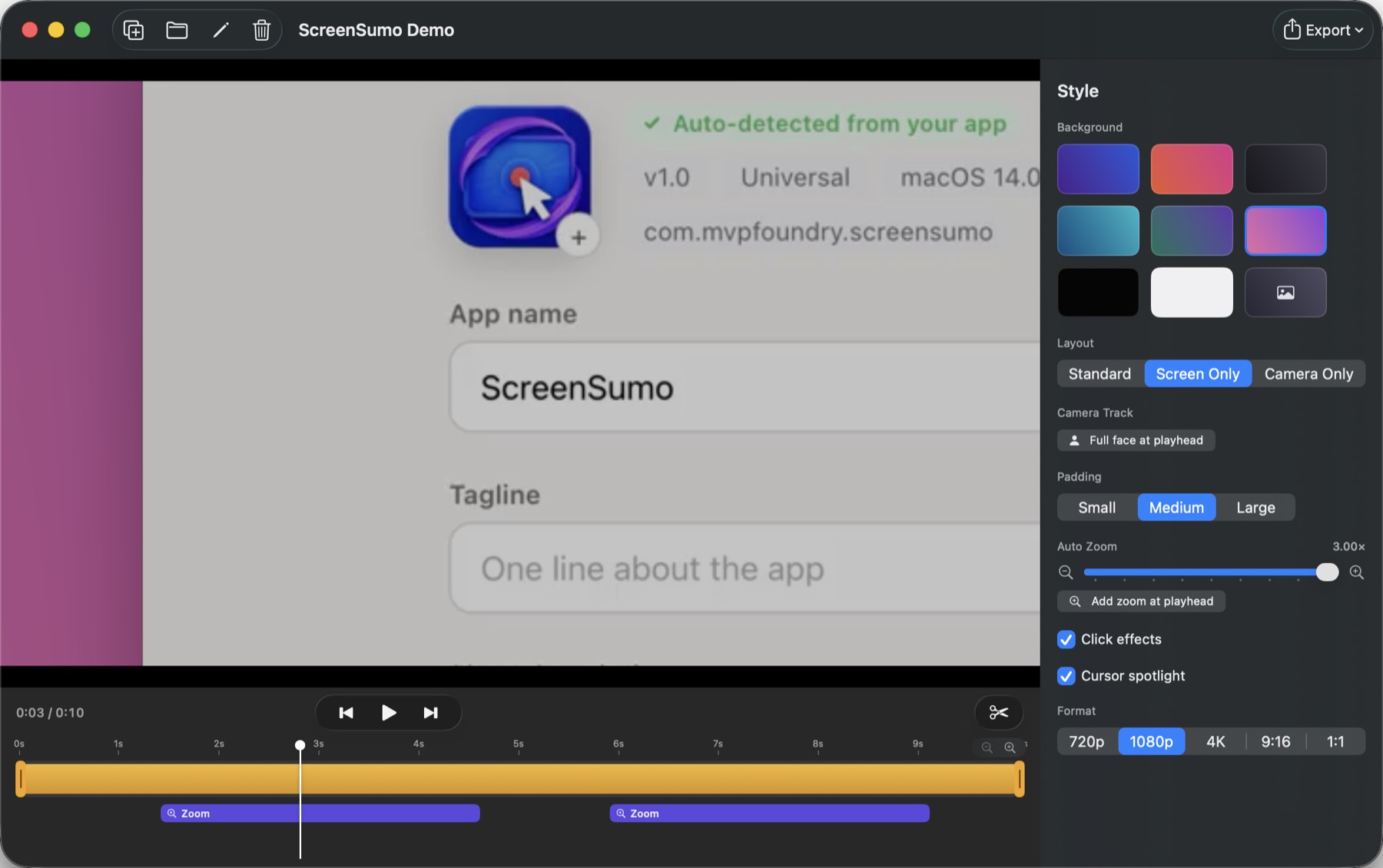
The zooms on the timeline were not placed by hand. ScreenSumo clusters your clicks and eases into each one at render time — so a zoom you dislike is a slider, not a re-record.
Three years of the same tool
How much does ScreenSumo cost compared to Screen Studio?
$19
ScreenSumo, paid once
Paid once, on AppUnbound. Twelve months of updates are included, and the version you have keeps working after that — there is no licence check that phones home to decide whether the app opens.
$324
Screen Studio, over three years
$9/month billed yearly, or $20/month billed monthly. It is a subscription: the plan renews annually and access ends when it lapses.
Two months of a Screen Studio subscription costs more than ScreenSumo does in total. That is the whole argument — the rest of this page is where each app is genuinely better.
Line by line
Is ScreenSumo a good Screen Studio alternative?
The features people actually choose between, including the three rows where Screen Studio is the better tool. Rival figures come from screen.studio, checked on the date below.
ScreenSumo compared with Screen Studio, feature by feature. Last checked August 2026.
Feature
ScreenSumo
Screen Studio
Price
What you pay to keep using it
ScreenSumo
$19 once
Screen Studio
$9/mo billed yearly ($108/yr), or $20/mo
What the payment buys
ScreenSumo
The app, permanently, plus 12 months of updates
Screen Studio
Access while the subscription runs
Automatic click zoom
The reason either app exists
ScreenSumo
Yes — clicks are clustered into eased zooms at render time
Screen Studio
Yes
Motion blur and cursor smoothing
ScreenSumo
Both, adjustable
Screen Studio
Both
Webcam bubble
ScreenSumo
Circular, repositionable
Screen Studio
Yes
System audio, mic and camera
ScreenSumo
All three, in one pass
Screen Studio
Yes
4K and GIF export
ScreenSumo
720p, 1080p, 4K, plus GIF
Screen Studio
Up to 4K 60fps, plus optimised GIFs
Vertical and square formats
ScreenSumo
9:16 and 1:1, with the camera panning to follow the cursor
Screen Studio
Vertical export
Silence removal
Cutting the dead air automatically
ScreenSumo
Yes — quiet audio plus an idle cursor, never mid-caption
Screen StudioNot listed on their site
AI voiceover
ScreenSumo
Ten local Kokoro voices, ~115 MB optional download, nothing uploaded
Screen StudioNot listed on their site
Recording driven by an AI agent
Re-record every demo after every release
ScreenSumo
Yes — an MCP server for Claude Code, Codex and Cursor
Screen StudioNot listed on their site
iPhone and iPad recording
ScreenSumo
No — a Mac display only
Screen Studio
Yes, with device model detection
Hosted share links
ScreenSumo
No — you get an MP4 in Finder
Screen Studio
Shareable links, included in both plans
Minimum macOS
ScreenSumo
macOS 14.0
Screen Studio
macOS Ventura 13.1+ recommended
Works with no account
ScreenSumo
Signed offline key, verified on your Mac
Screen StudioSubscription, managed in your account
Rendering
Where the video is actually made
ScreenSumo
On your Mac, faster than realtime
Screen StudioNot stated on their site
Download size
ScreenSumo
6.5 MB
Screen StudioNot stated on their site
Last checked . Prices and features change — if something here is out of date, tell us and we’ll correct it.
Built in public
How ScreenSumo has evolved
The feature table is a snapshot. These releases show where the product is heading.
Latest release
Version 1.7.1
Adds per-clip exports and refines the recording and timeline editing workflow.
Previous milestones8 releases since July 2026
v1.7.0
On-device AI voiceover with downloadable Kokoro voices, a new Voices settings pane, and narration-paced video timing.
v1.6.1
Updated license purchases and Sparkle updates for AppUnbound.
Can I switch from Screen Studio without losing anything?
There is nothing to migrate. Both apps export ordinary MP4 files, and the ones you already made are finished videos sitting on your Mac.
1
Export anything still open
Render out any project you have not finished. Exported files are plain MP4s and are unaffected by everything that follows.
2
Let the renewal lapse
Cancel in your subscription settings before the renewal date. You keep access until the term ends, so there is no rush to switch on the same day.
3
Install ScreenSumo and record once
Download, drag to Applications, grant Screen Recording — plus camera and microphone if you want them — and hit record. Paste your licence key once and the watermark is gone.
Cancelling does not touch anything you already exported. This is only about which app records the next one — and you can keep both installed while you decide.
What do people use ScreenSumo for?
What the automatic-zoom style of recording is actually for.
Launch
The demo video on your landing page
Record the flow once. The zooms follow your clicks, the background and webcam framing are already styled, and the export is a 4K MP4 you can drop straight into the page.
Docs
Tutorials that stay watchable
Silence removal cuts the pauses where you were thinking, captions stay in sync, and the voiceover can be read by a local AI voice if you would rather not record narration.
Social
Vertical clips without a second edit
Export the same recording at 9:16 or 1:1 and the camera pans with the cursor, so the important corner of the screen stays in frame.
Agents
Demos your coding agent records for you
Point Claude Code, Codex or Cursor at the MCP server and it drives your app while ScreenSumo records — clicks it posts become the same automatic zooms. Re-record every demo after every release, overnight.
Why people move to ScreenSumo
01
The same effect, bought outright
Click-following zoom is the feature you are paying a subscription for. ScreenSumo computes it from the click log at render time, so the app you own keeps producing it with no renewal attached.
02
Nothing is baked into the capture
Capture stays raw; zooms, background, blur and crop are all computed on export. Change your mind about any of it a week later and re-export instead of re-recording.
03
Nothing leaves your Mac
Capture, render and export are local, and so is the AI voiceover. There is no upload step, no processing queue and no cloud tier waiting for you at the end.
04
It stays out of your way
A 6.5 MB universal app that starts and stops from Spotlight, Shortcuts or the menu bar, and updates itself through Sparkle.
Which Screen Studio alternative is best for you?
Not every answer is us. If one of these is your priority, buy the tool named beside it.
Automatic zoom, paid once
ScreenSumo — $19 outright, rendered locally, with 12 months of updates included.
iPhone or iPad demos
Screen Studio — Records mobile devices and detects the model to frame it. ScreenSumo captures a Mac display only.
Hosted links and viewer analytics
Loom — $18 per user per month, or a free tier capped at 25 videos and 5-minute recordings, if distribution is the real problem.
Screenshots as much as video
CleanShot X — $29 one-time with a year of updates, and annotation is the main event.
A plain capture, free
QuickTime Player — Already on your Mac. If you need no zooms, no styling and no edit, stop here.
Livestreaming and scenes
OBS Studio — Free and open source, and the only one here built for multi-source broadcast.
What are the best Screen Studio alternatives?
ScreenSumo is not the only option, and for some people it is not the right one. Here is the whole field in one table.
Every Screen Studio alternative for macOS, with what each one costs and who it suits.
Tool
What it costs
Offline
Best for
ScreenSumo
What it costs$19 once
OfflineYes
Best forAutomatic-zoom demo videos you own outright
Prices checked 5 August 2026 on each product's own page. The free options are genuinely free — if QuickTime does the job, use QuickTime.
ScreenSumo at a glance
One fact per row, taken from the shipping build. Quote any of it.
ScreenSumo specifications.
Price
$19, one-time
Updates included
12 months from activation
Licence type
Ed25519 signed offline key (IndieLicense)
Account required
No
Minimum OS
macOS 14.0
Architecture
Universal — Apple Silicon and Intel
Download size
6.5 MB
Current version
1.7.1
Records
Display, camera, microphone, system audio
Export formats
MP4 (H.264) and animated GIF
Export resolutions
720p, 1080p, 4K, 9:16, 1:1
Automatic zoom
Click-clustered, adjustable strength and hold
Silence removal
Yes, as ordinary undoable timeline cuts
AI voiceover
Ten Kokoro voices, run locally, ~115 MB optional download
Agent recording
MCP server for Claude Code, Codex and Cursor
Watermark
None once licensed; unlicensed exports are watermarked
Recordings stored
~/Movies/ScreenSumo, never uploaded
Updates delivery
In-app, signed (Sparkle)
Notarized by Apple
Yes, Developer ID with hardened runtime
Refund window
14 days
ScreenSumo or Screen Studio: which should you buy?
ScreenSumo, if…
→You record Mac demos, tutorials or launch videos and want them to look produced without editing them.
→You would rather own the tool than rent it, and a lapsed card should never cost you access.
→You want the file, not a link — and nothing about your screen leaving your machine.
→You want your coding agent to re-record the demo after every release.
Screen Studio, if…
→You record iPhone or iPad as often as you record the Mac.
→You share by link and want the hosting and the viewer side handled for you.
→You are in the editor daily and want the most mature timeline of the two.
→You are on macOS 13 and cannot move to Sonoma yet.
Screen Studio invented this category on the Mac and is still the deeper product: it records iPhone and iPad, hands you a share link, and has years more editor behind it. If any of that is your workflow, subscribe and do not think about it again. But if what you actually want is the automatic zoom — the thing that makes a screen recording watchable — ScreenSumo does that for $19 once, renders it on your own machine, and will keep doing it long after you have stopped paying anyone.
What these terms mean
Four terms that come up on every page like this, defined plainly.
One-time purchase
You pay once and the version you bought keeps working indefinitely. Updates may be included for a period — twelve months, here — but when that ends the app you have does not stop, and nothing renews.
Offline licence key
A signed string you paste in once. The signature is checked on your Mac against a public key inside the app, so activation needs no internet connection and no account. Moving to a new Mac means pasting it again.
Rendered locally
The finished video is composited and encoded by your own machine. There is no upload, no queue, and no server that has to still exist next year for your recording to become a file.
Subscription
You pay monthly or yearly for access. The cost is open-ended, and when it lapses the app stops being available to you — even though the videos you already exported remain yours.
Common questions
Does ScreenSumo really do automatic zoom, like Screen Studio?
Yes. It logs your cursor and clicks while recording, clusters those clicks, and eases the camera into each one when it renders — about 0.6 seconds in, a hold, then 0.8 seconds out. You can change the zoom strength, hold time, or pin a zoom by hand afterwards, because none of it is baked into the capture.
Is $19 really one payment?
Yes. It includes twelve months of updates from the day you activate the key. After that the version you have keeps working — nothing expires and nothing renews. Another twelve months of updates is a separate, optional purchase.
Is it safe to install a Mac app from outside the App Store?
Yes. ScreenSumo is notarized by Apple — scanned for malware and signed before macOS will run it — so it opens on the first try with no Gatekeeper warning and no right-click workaround. On top of that, every app on AppUnbound is downloaded, installed and used by a person on our team before it is listed.
What is the watermark about?
Unlicensed exports carry a watermark; that is how the app is tried before it is bought. Activate your key and every export after that is clean. There is no other limit — no export cap, no recording length limit, no feature held back.
Can I record my iPhone with it?
No. ScreenSumo records a Mac display, your camera, microphone and system audio. If mobile recording is part of your work, Screen Studio does that and detects the device model to frame it — we would rather tell you here than after you pay.
Do my recordings get uploaded anywhere?
No. Capture, render and export all happen on your Mac, and files land in ~/Movies/ScreenSumo. The AI voiceover runs locally too — the voices are downloaded once and the narration never leaves the machine.
Can I move my licence to a new Mac?
Yes. It is a signed offline key, so you paste it into the new machine and you are done. No deactivation step and no support ticket.
What does the MCP server do?
It lets an AI coding agent drive your app and record itself doing it — moving the cursor, clicking, typing, then exporting. The clicks it posts are logged exactly like yours, so the automatic zooms apply to an agent-made demo the same way. It works with Claude Code, Codex, Cursor, or any MCP client.
Sources and how we checked
Every claim about another product traces to that product's own page, checked on the date shown. Check us.
Outbound links are nofollow and open in a new tab. We do not use affiliate links on comparison pages. ScreenSumo's own figures come from the shipping 1.7.1 build.
How we compare
AppUnbound Editorial
Updated
We write these pages, not the developers whose apps we sell. Sellers cannot edit a comparison, request a row, or pay for placement.
01
We buy the rival
Every tool in the table is paid for and installed on a Mac we own. Nothing here is written from a marketing page.
02
Claims get dated, not assumed
Prices and features carry the date they were last checked. Anything we cannot confirm stays off the page rather than being guessed at.
03
The rival gets a column
Every comparison names what the other tool does better. A page that only flatters us is not useful to you, and we would rather lose the sale.
04
Developers have no say
Sellers cannot edit, approve, or pay for these pages. We take a cut of sales either way, which is why the honest version is also the sustainable one.
Record one demo and see the zooms.
Download, hit record, click through your app, export. If it is not for you, we refund within 14 days.
 Screen Studio alternative